LightWeb: Android TV browser for clean, remote-first web access
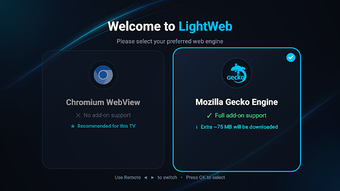
LightWeb renders web pages on TV using two engines, Chromium WebView and GeckoView, so streaming sites and interactive pages display correctly on large screens. Karya Nest builds this Android TV utility for remote-centered browsing and file downloads, with built-in ad filtering and a virtual cursor for D-Pad navigation. The app adds hardware-accelerated full-screen video and a download manager, aimed at TV owners who want a quieter, privacy-focused browsing session.
What the browser actually does for TV browsing
LightWeb handles page rendering and media playback by letting the user switch between Chromium WebView and Mozilla GeckoView, which addresses compatibility differences across streaming and interactive sites. It presents multi-tab browsing, bookmarks, and a built-in download manager for saving APKs, media, and documents directly to the device. The app also applies automatic page scaling and a customizable 100%–200% zoom so pages fit television screens without manual resizing.
How it affects system resources during use
LightWeb keeps resource use appropriate for TV hardware by relying on hardware acceleration for H.264 and VP9 video playback, which offloads decoding to the device and reduces CPU work during streaming. Background tasks like downloads and ad blocking run alongside rendering; devices meeting the minimum Android 7.0 requirement can run the app, and the architecture is aimed at TV-class processors rather than touch smartphones.
Is the browser safe for private browsing on shared devices?
Privacy is enforced by design, with zero telemetry and no data collection stated by the developer, and an integrated uBlock-style ad blocker that blocks trackers, pop-ups, and video ads. For operations that modify storage, the app requests device storage access to save files through its download manager; that permission is required to store APKs, media, or documents locally.
Can a non-technical user operate it with a TV remote?
Remote-first navigation is central to the experience. The app provides a virtual mouse cursor plus D-Pad controls so standard TV remotes can move across complex web layouts without an external mouse or keyboard. The on-screen cursor and D-Pad mapping aim to make form inputs and menus accessible from a distance, though some interactive web elements may still require more precise pointer control.
Suitable for remote-centric TV users who prioritise privacy
LightWeb suits viewers who need an ad-reduced, remote-operable browser for streaming and direct downloads on Android TV-class devices; it targets TV ergonomics rather than phone or desktop use. Expect a short adjustment period when using the on-screen pointer for complex sites. Recommended.